1. Purpose of THUNDERBOARD
THUNDERBOARD is an emergency management weather operations dashboard designed to help users monitor county-level weather threats, warnings, radar context, river gauges, historical weather reports, and operational decision-support information.
It is intended for situational awareness, planning support, event documentation, shift-change briefing, and after-action review.
2. Quick Start
- Open THUNDERBOARD in a browser.
- Confirm the selected county in the header.
- Review the map, active alerts, Impact Confidence, and situational brief.
- Open the Status page if source data looks stale or missing.
- Use the EOC Weather Event Log or Historical Report Builder when documentation is needed.
3. Main Dashboard
The main dashboard is the primary operating view. It gives the user a county-centered view of current weather, alert context, map/radar display, river conditions, and operational decision-support panels.
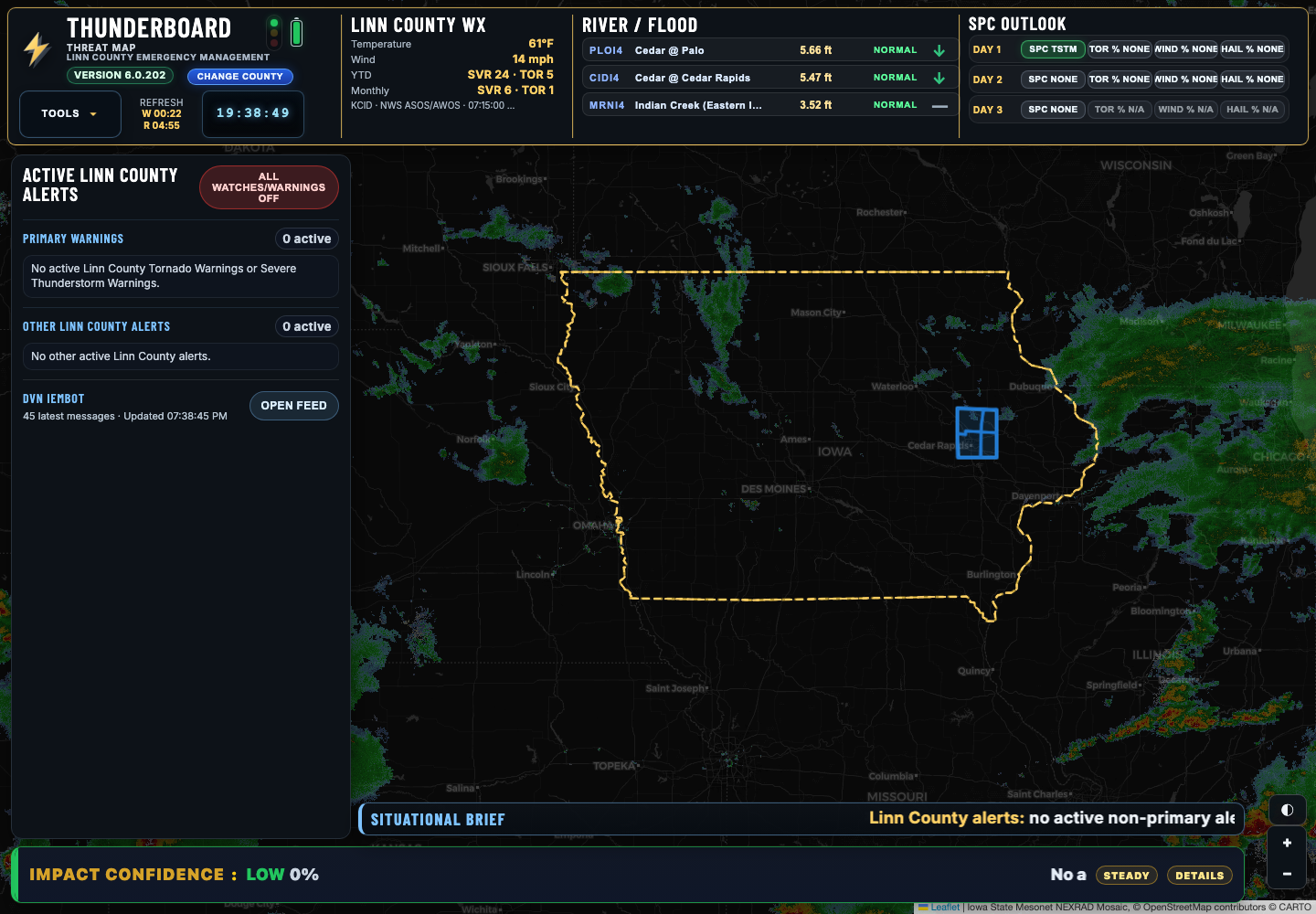
Using the Dashboard
- Active County: Use the blue Change County pill in the header to switch counties. The dashboard reloads the map, alerts, weather source, river gauges, and county-specific context for the selected county.
- Map View: Use the map to review the selected county outline, radar context, active warning polygons, cameras, rivers, storm reports, and other enabled layers.
- Alerts and Briefing: Review active alerts, watches, advisories, flood products, and the Situational Brief for current county-level conditions.
- Impact Confidence: Use the confidence panel as a quick operational read on current severe-weather concern and supporting factors.
- Status Page: If a feed, layer, or timestamp looks stale, open the Status page to check source health and refresh timing.
County Mode
THUNDERBOARD uses county mode to adjust map position, county boundary, weather context, warnings, river gauge prioritization, and reporting filters. County mode allows the same dashboard to support any Iowa county while preserving local operational context.
4. Alerts and Impact Confidence
The Active County Alerts area summarizes current alert products relevant to the selected county. THUNDERBOARD is designed to reduce noise by separating high-priority warning context from general situational products.
Impact Confidence
Impact Confidence is a deterministic operational score generated by THUNDERBOARD. It summarizes warning status, polygon intersection, warning age, hazard tags, radar/SPC context, local place mentions, and other factors.
Apple Local AI may assist with wording the explanation, but the score itself is generated by THUNDERBOARD logic.
5. EOC Weather Event Log
The EOC Weather Event Log is a timeline of operationally relevant weather information. It may include warning products, IEMBot messages, storm reports, radar snapshots, and other weather-source context.
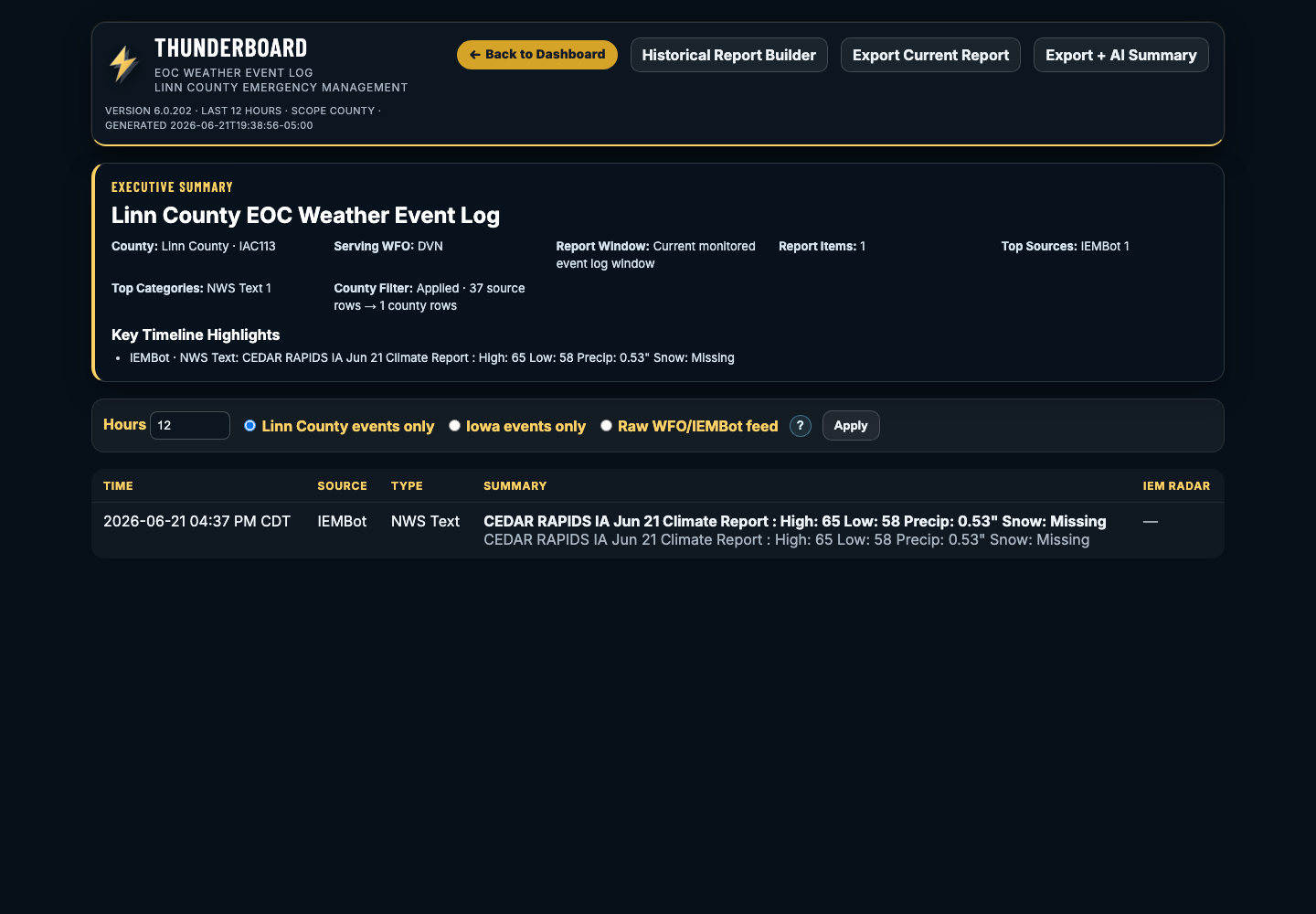
When to Use It
- During severe weather monitoring
- During EOC activation
- For shift-change review
- When reconstructing what happened during an event
- When preparing an after-action report or summary packet
6. Historical Weather Report Builder
The Historical Weather Report Builder creates PDF or HTML reports from archived weather data. Users can select a date and time window, WFOs, state filters, county scope, radar options, and output format.
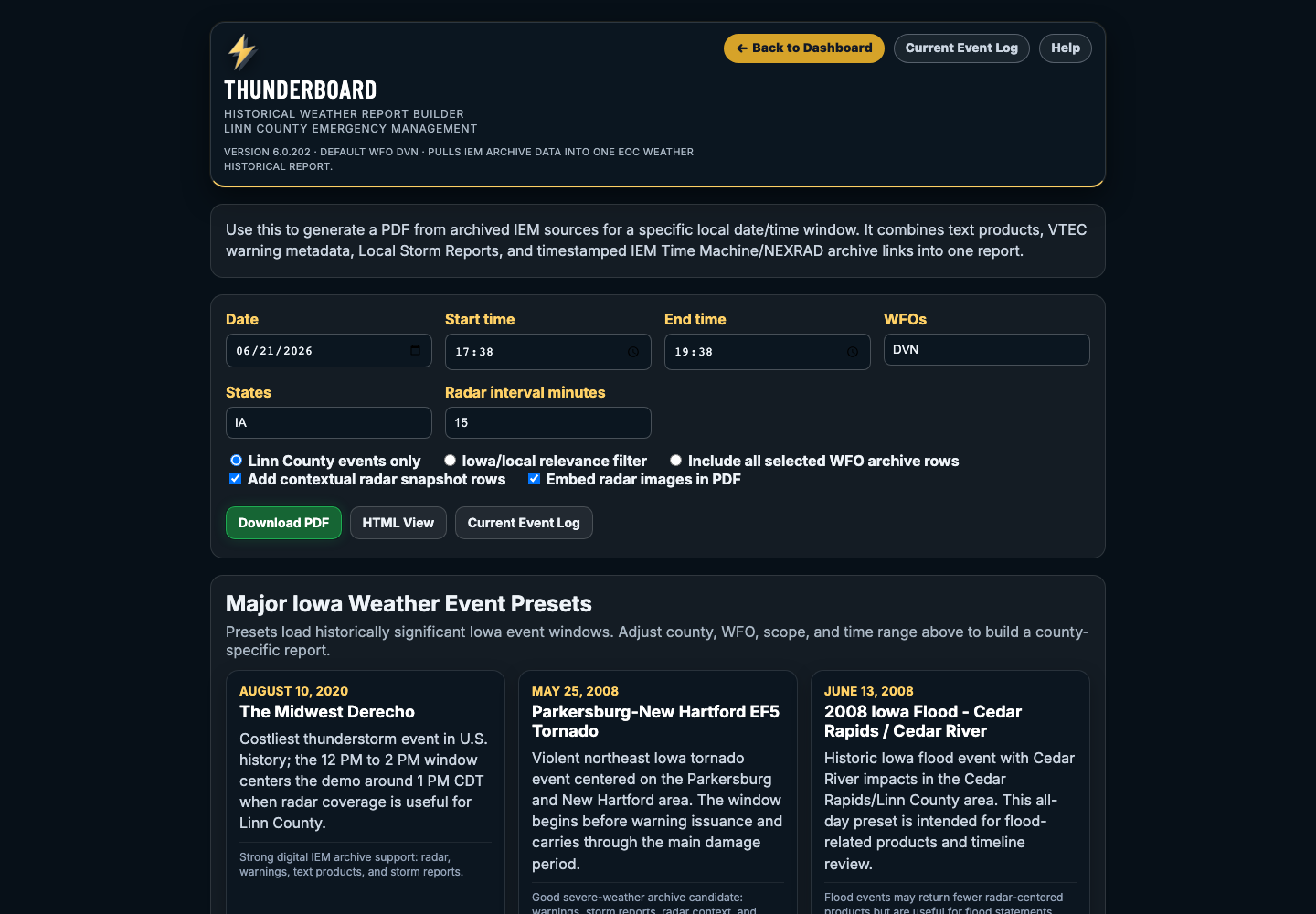
How to Build a Custom Report
- Select the event date.
- Enter the start and end time.
- Confirm or adjust WFOs.
- Choose the report scope.
- Choose whether to include radar rows and embedded snapshots.
- Select Download PDF or HTML View.
| Scope | Use Case |
|---|---|
| County events only | Best when preparing a county-specific event report. |
| Iowa/local relevance filter | Best first pass for most historical Iowa events. |
| All selected WFO archive rows | Best for broad review, but may include neighboring-state items. |
7. Historical Event Presets
Presets load historically significant Iowa event windows. They are starting points, not final county-specific reports. Users can adjust the county, WFOs, scope, and time range after selecting a preset.
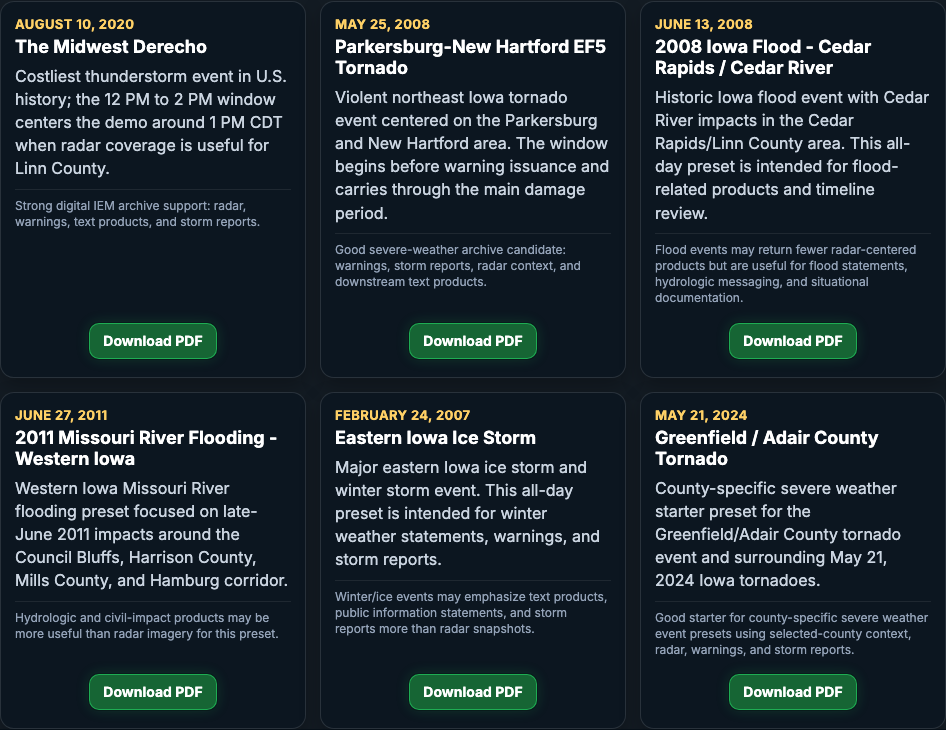
How to Use Presets
- Open the Historical Weather Report Builder.
- Scroll to Major Iowa Weather Event Presets.
- Select Download PDF for the desired event.
- Review the generated report.
- If needed, return to the builder and narrow the scope to a specific county or WFO.
8. Status Page
The Status page shows application health, source status, version information, AI availability, and operational endpoints.
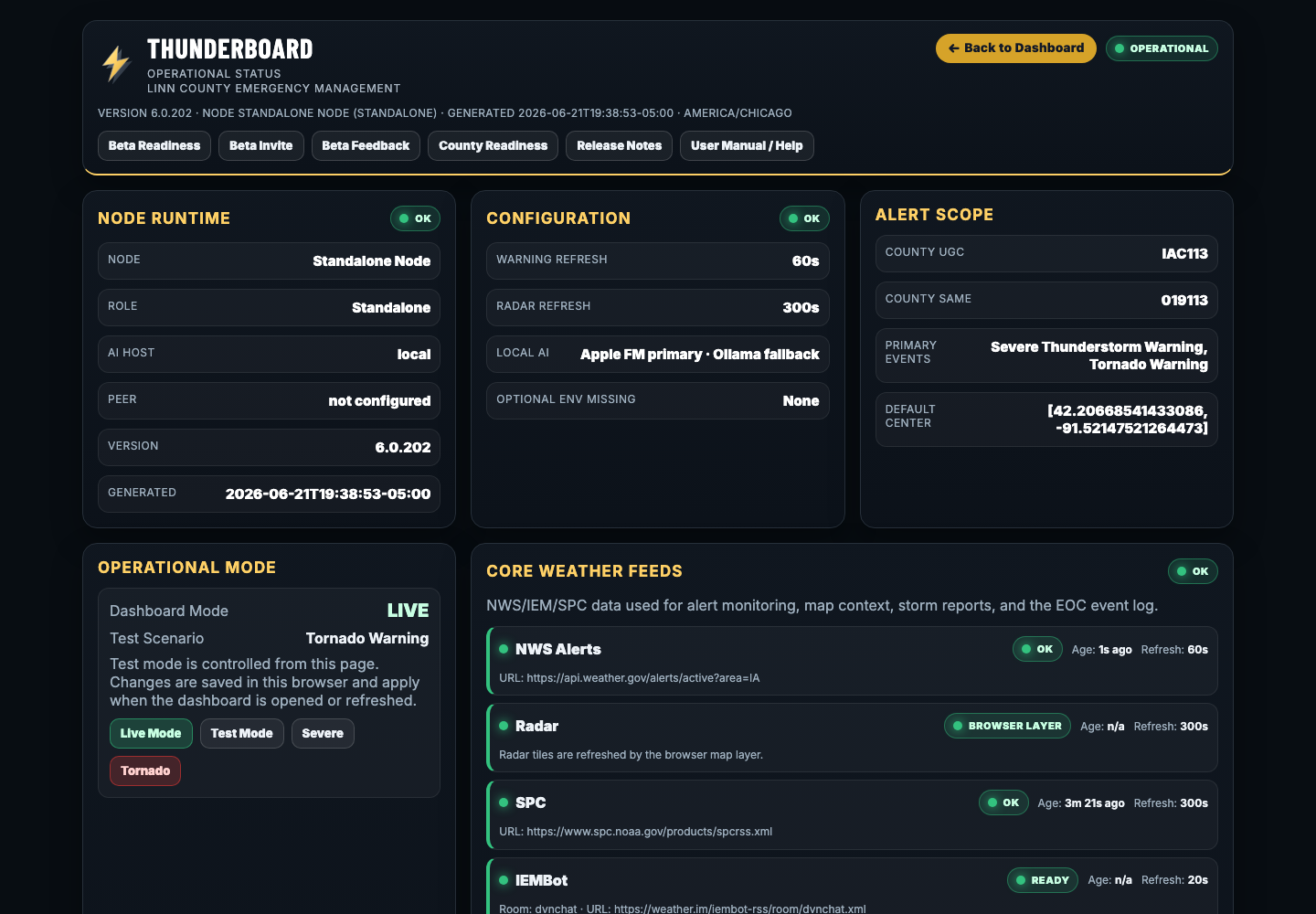
Use Status When
- Data looks stale
- A source card looks wrong
- Radar, alerts, or reports are missing
- AI summary tools are not responding
- You need to confirm the current app version
9. Common Workflows
Routine Monitoring
- Open the dashboard.
- Confirm county.
- Review alerts and radar.
- Check rivers if flooding is possible.
- Leave dashboard open for continued monitoring.
Severe Weather Operations
- Monitor Active Alerts.
- Review Impact Confidence.
- Check radar and warning context.
- Open the Event Log.
- Export reports as needed.
After-Action Review
- Open Historical Report Builder.
- Select date/time or preset.
- Adjust scope.
- Generate PDF.
- Save report with incident records.
10. Important Limitations
- THUNDERBOARD depends on upstream data sources.
- Source delays may affect what appears on the dashboard.
- Historical archives may return broad regional products.
- AI text is a summary aid and not an authoritative weather source.
- Official NWS products and agency policy remain authoritative.
11. Glossary
| Term | Meaning |
|---|---|
| IEMBot | Iowa Environmental Mesonet feed of NWSChat-style weather products. |
| WFO | Weather Forecast Office, such as DVN, DMX, OAX, FSD, or ARX. |
| LSR | Local Storm Report. |
| SPC | Storm Prediction Center. |
| VTEC | Valid Time Event Code used in NWS alert products. |
| Impact Confidence | THUNDERBOARD’s deterministic operational confidence score. |